OpenClaw学习笔记
什么是OpenClaw
其实就是最近大火的clawdbot,已经经历过3次改名了(clawdbot -> moltbot -> OpenClaw)。是的,如果你是采用某些云上提供的clawdbot现成镜像,已经落后至少两个大版本了。
OpenClaw一些命令
安装
# macOS/Linux
curl -fsSL https://openclaw.ai/install.sh | bash

# Windows
iwr -useb https://openclaw.ai/install.ps1 | iex
卸载
openclaw uninstall
npm uninstall -g openclaw
运行
# 一般运行
openclaw dashboard

# 使用ollama本地模型运行
ollama launch clawdbot
重启
openclaw gateway restart
使用DeepSeek模型
# 配置模型
openclaw config set 'models.providers.deepseek' --json '{
  "baseUrl": "https://api.deepseek.com/v1",
  "apiKey": "[APIKEY]",
  "api": "openai-completions",
  "models": [
    { "id": "deepseek-chat", "name": "DeepSeek Chat" },
    { "id": "deepseek-reasoner", "name": "DeepSeek Reasoner" }
  ]
}'

# 设置默认模型
openclaw models set deepseek/deepseek-chat
远程访问
# 隧道访问
ssh -N -L 18789:127.0.0.1:18789 lishewen@IP

# 配置原生IP远程访问(127.0.0.1 -> 0.0.0.0)
openclaw config set gateway.bind "lan"

# 配置允许HTTP访问
openclaw config set gateway.controlUi.allowInsecureAuth true
OpenClaw使用
skill 安装
- 通过
ClawHub搜索安装(https://www.clawhub.ai/) - 安装命令
npx clawhub@latest install [skillname]
企业微信机器人
安装插件
git clone https://github.com/Jams-hub/openclaw-wecom-channel.git
npm install
openclaw plugins install --link wecom
openclaw plugins enable wecom
openclaw gateway restart
创建企业微信机器人
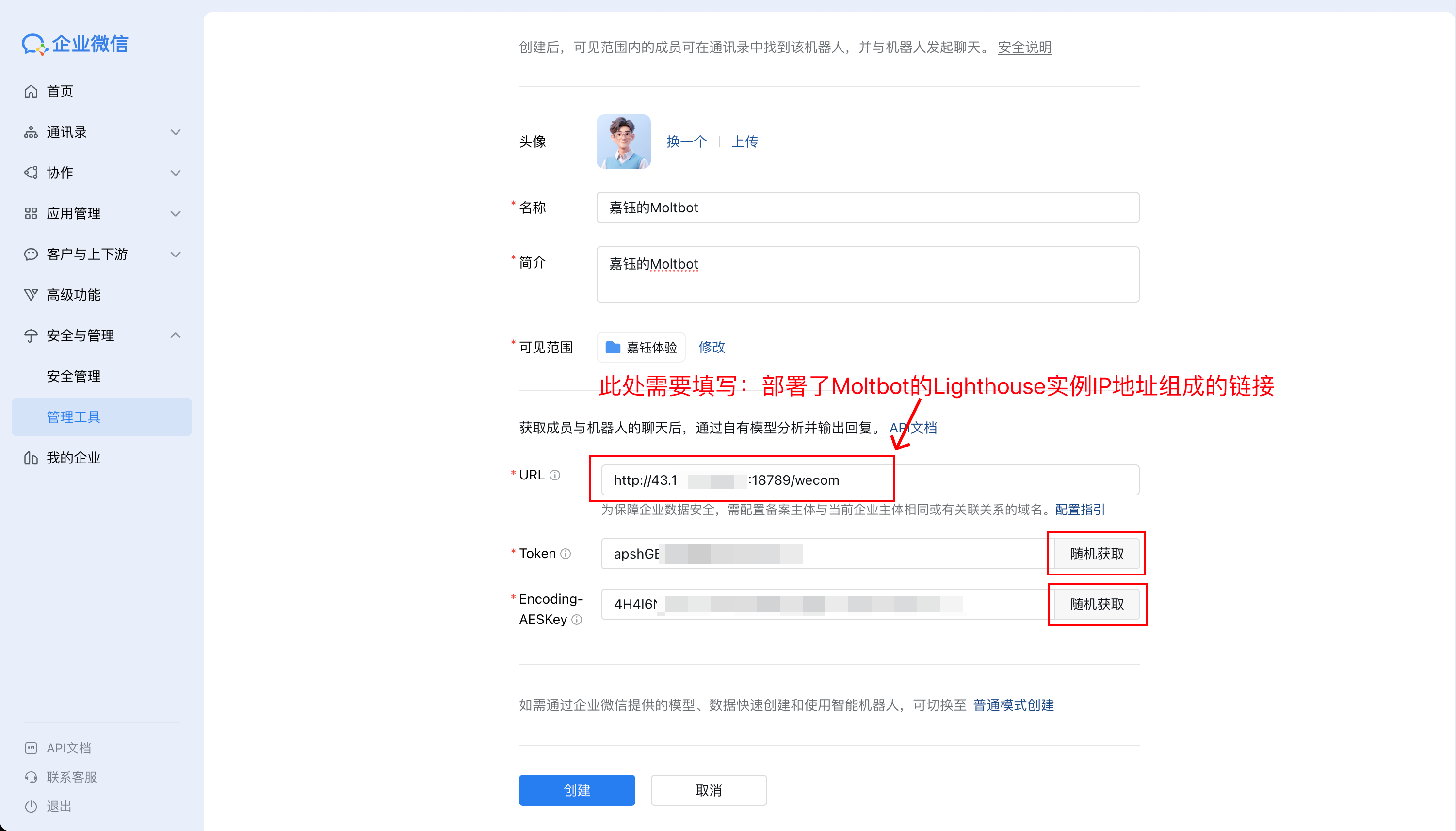
编辑~/.openclaw/openclaw.json
{
  "channels": {
    "wecom": {
      "enabled": true,
      "webhookPath": "/wecom",
      "token": "YOUR_TOKEN",
      "encodingAESKey": "YOUR_ENCODING_AES_KEY",
      "receiveId": "",
      "dm": { "policy": "pairing" }
    }
  }
}
短期成果
[视频号占位]